
How Base16 represents bytes
Base16, usually called hexadecimal or hex, writes binary data with the digits 0 through 9 and the letters A through F. Each digit carries four bits, so a byte becomes a pair of hex digits. RFC 4648 defines this alphabet and the byte-to-pair conversion.1
That fixed width is hex's useful trick. Scan 00, 7F, or FF and you are looking at one byte each — no delimiter is needed to find the boundary.
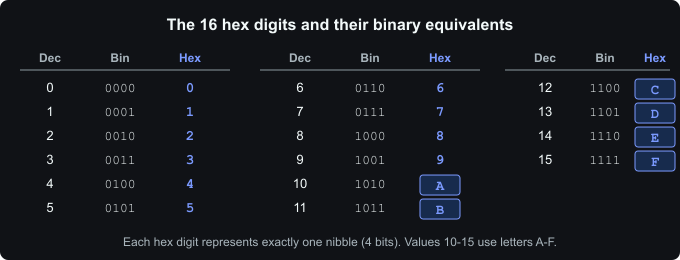 The 16 hex digits
From one byte to two digits
Start with the byte for the ASCII letter A: binary 01000001. Split the bits in half:
0100has the value 4.0001has the value 1.
Use those values as positions in the Base16 alphabet and the result is 41. The same operation applied to every byte turns foobar into 666F6F626172, matching the RFC 4648 test vector.2
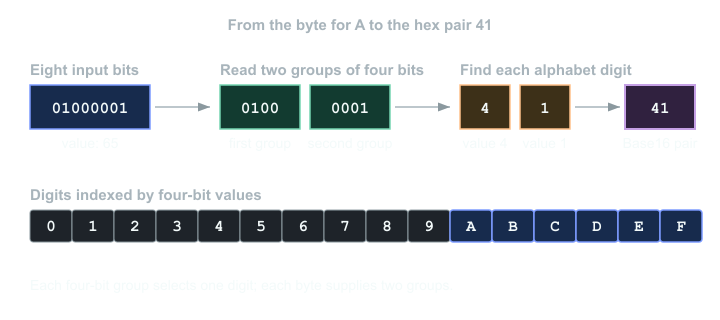 Base16 encoding process
The four-bit halves are often called nibbles. Decoding reverses the steps: translate each hex digit to four bits, join each adjacent pair, then interpret the resulting bytes in the format you expect. Base16 itself does not say whether those bytes contain text, an image, or something else.
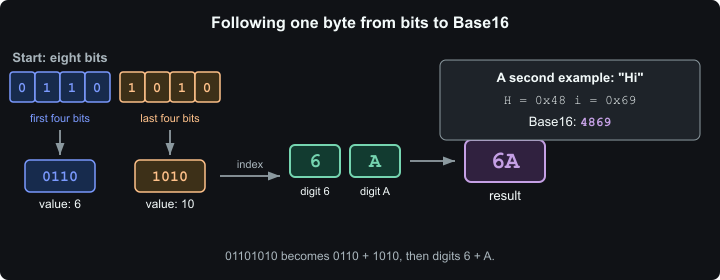 Splitting a byte into hexadecimal digits
RFC 4648's Base16 output uses uppercase A through F, while its decoder guidance permits either case unless another specification says otherwise.3 Hexator's encoder emits contiguous lowercase digits, and its decoder accepts the format described by the tool.
Why Base16 needs no padding
Base64 collects input in 24-bit groups and Base32 uses 40-bit groups. An incomplete final group may therefore need = padding. Base16 works on each eight-bit byte independently: two four-bit digits account for the whole byte, so padding has no role.4
The price is length. A byte becomes two ASCII characters, which means the encoded form has twice as many bytes as the original when stored as ASCII. Base64 usually takes less space; hex keeps byte boundaries visible. I reach for hex when I need to compare values by eye and Base64 when compact text transport matters more.
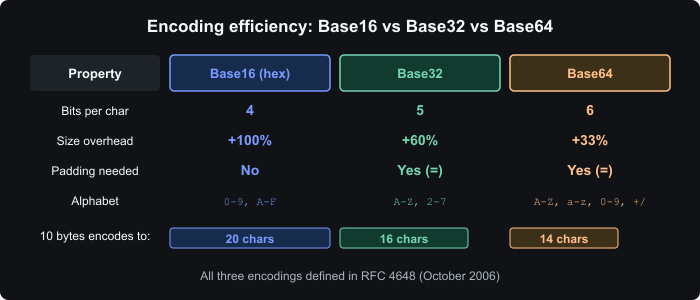 Encoding efficiency comparison
Places you already read hex
CSS hex colors are a familiar example. In #ff6633, the pairs ff, 66, and 33 specify the red, green, and blue components. CSS Color 4 also defines three-, four-, and eight-digit forms, and treats letter case as irrelevant.5
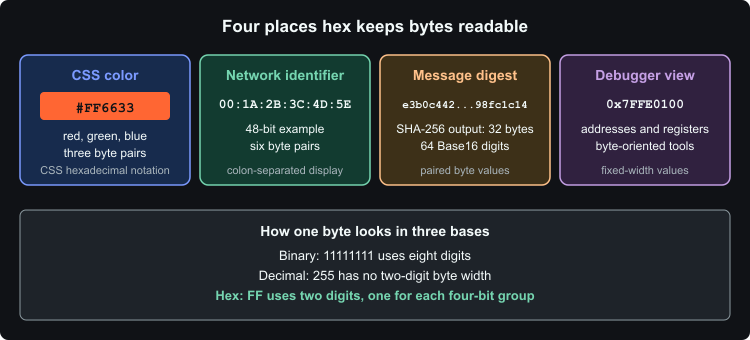 Common hexadecimal displays
Hashes are commonly displayed the same way. SHA-256 produces a 256-bit message digest; rendering its 32 bytes as Base16 takes 64 digits.6 Debuggers and hex editors also use paired digits because addresses and byte values stay aligned.
Programming languages expose the notation directly. Many use a 0x prefix for integer literals, such as 0xFF. Python makes the distinction particularly clear: bytes.hex() returns two hex digits for every byte, while bytes.fromhex() performs the reverse conversion.7
payload = b"Hi"
encoded = payload.hex()       # "4869"
decoded = bytes.fromhex(encoded)
Hex looks simple because it is simple: one alphabet lookup per nibble, two digits per byte. That predictability matters more than density when a person needs to inspect the underlying bytes.
Citations
-
RFC Editor: RFC 4648, Section 8 — Base 16 Encoding. Retrieved September 6, 2026 ↩
-
RFC Editor: RFC 4648, Section 10 — Test Vectors. Retrieved September 6, 2026 ↩
-
RFC Editor: RFC 4648, Sections 3.4 and 8 — Choosing the Alphabet and Base 16 Encoding. Retrieved September 6, 2026 ↩
-
RFC Editor: RFC 4648, Sections 6–8 — Base32, Base64, and Base16. Retrieved September 6, 2026 ↩
-
W3C: CSS Color Module Level 4, RGB Hexadecimal Notations. Retrieved September 6, 2026 ↩
-
NIST: FIPS PUB 180-4 — Secure Hash Standard. Retrieved September 6, 2026 ↩
-
Python Software Foundation: Binary Sequence Types — bytes, bytearray, memoryview. Retrieved September 6, 2026 ↩
Updated: September 6, 2026